Stop switching between tabs. Notedaisy lets you view, highlight, and annotate PDFs while keeping your notes organized in the same study workspace.
View PDFs and Take Notes Side-by-Side
Most students use one app to read PDFs and another to take notes. That fragmented workflow slows you down.
Notedaisy combines a powerful PDF viewer with structured note taking so you can read lecture slides, research papers, and textbooks while building organized study notes in one place.
Open lecture slides directly in your workspace
Take notes alongside your PDF
Keep everything organized by subject and topic
Highlight and Annotate PDFs with Purpose
Active reading is essential for real understanding. With Notedaisy’s PDF annotation tool, you can:
Highlight key concepts
Add inline stickynotes
Mark important definitions
Annotate research papers
Your highlights aren’t isolated — they connect directly to your structured notes.
Built for University Lectures & Research
Whether you’re reviewing lecture slides, annotating academic readings, or analyzing research papers, Notedaisy is designed for serious academic workflows.
– Annotate lecture PDFs during class
– Break down complex readings into structured notes
– Organize research materials by module
– Prepare efficiently for exams
Turn Annotated PDFs Into Study Tools
Your PDF annotations shouldn’t stay buried in a document.
In Notedaisy, you can turn highlighted content into flashcards and quizzes — transforming passive reading into active recall.
One workspace. One connected study system.
A Better Alternative to Basic PDF Annotators
Generic PDF annotation tools weren’t built for students. They let you highlight — but they don’t help you study.
Notedaisy combines PDF viewing, annotation, and structured note taking in one academic-focused platform.
Google Docs + Notion Inspired Text Editor.
Taking the familiarity of Google Docs with the best of Notion.
Notedaisy’s note-editor is designed to make note-taking as fluid as possible with emphasis on visual learning.
It’s the only student-focused note-editor tool available which is the core of Notedaisy’s learning philosophy.
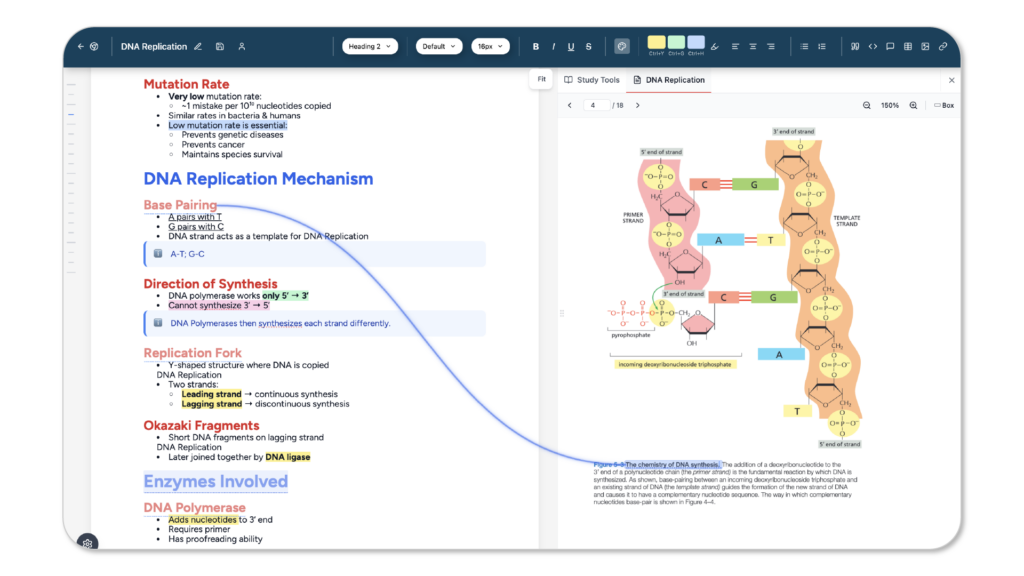
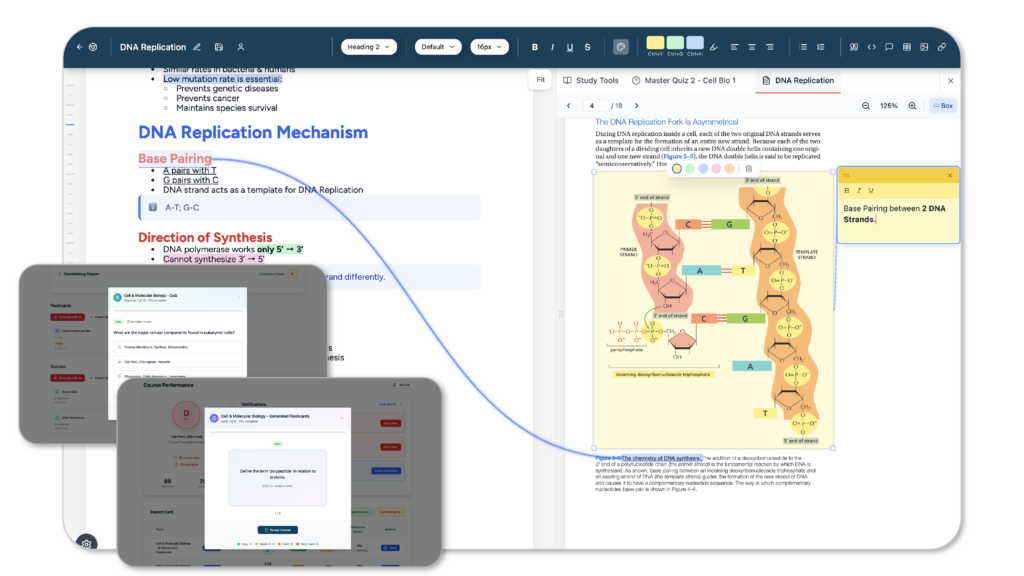
Side-by-side Notes & PDF View with Annotations and Linking.
Skip using a PDF viewer in a different window.
Upload and view PDFs right beside your notes, create sticky notes, and link sentences from your notes to your PDF highlights.
Connect ideas and understand concepts better with this feature you can’t find anywhere else.
In-built ChatGPT Chatbot Tutor.
Dive deeper to a specific topic with an in-built chatbot tutor powered by ChatGPT.
The chatbot recognises your notes and files immediately making sure responses remain relevant while discovering something new to learn.
Create Flashcard Decks & Quiz Items while Taking Notes.
Is manually creating flashcards too inefficient?
Get the ability to create flashcards and quiz items right beside your notes. Place flashcard items within your notes too so you can find what you missed later on and connect concepts to one another.
Have the ability to revisit your material with consistency using our spaced repetition system integrated with our smart folder and grading system.
Generate Flashcards & Quizzes with AI Sourced from In-app Notes of Uploaded PDFs.
For those who can’t find time to create flashcards or quizzes manually, we have an in-built AI generator to create them for you.
Source information from in-app notes you create or the PDFs you uploaded.
Discover a more integrated way of doing AI-generated flashcards and quizzes with Notedaisy’s holistic learning method.
Track Progress with Smart Folders and a Grading System.
Organise your folders by your classes.
Each folders has it’s own grade depending on your study performance using flashcards and quizzes generated within the app.
Seamless Interactivity between Notes, PDFs, and Review Materials.
Notedaisy’s philosophy is to encompass the entire learning process from capture to review.
It’s the only note-taking/study hub to do so with a seamless integration of notes, annotator, flashcards, and quizzes.
If you rely on PDFs for lectures, readings, or research, your annotation tool should be part of your study system — not separate from it. </p> <p> Start using a PDF annotator built specifically for students.