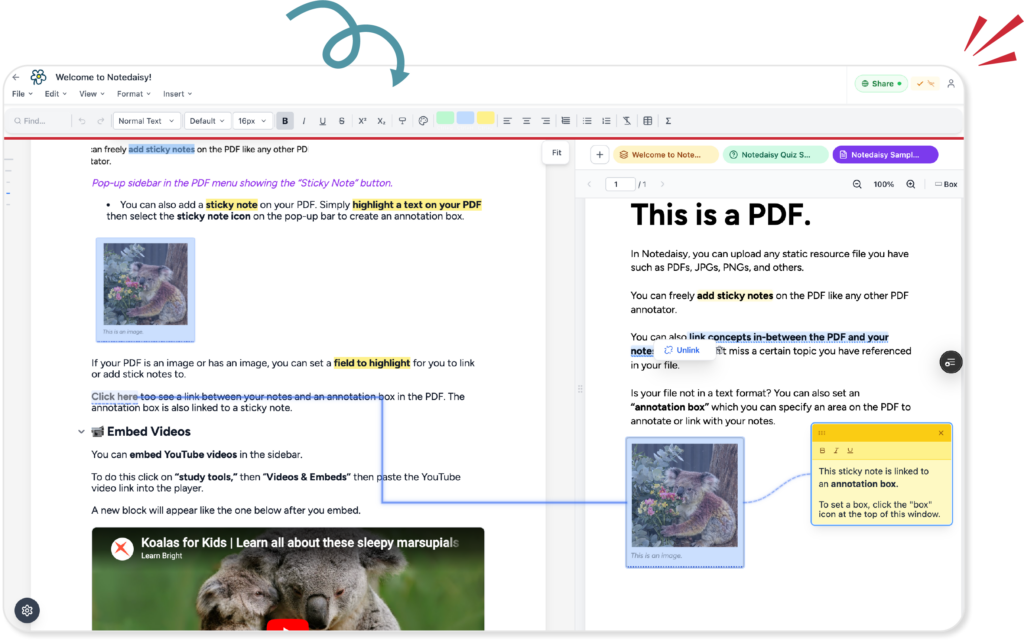
Whether you’re a high school student, university learner, or educator, one thing’s certain: effective learning starts with effective note-taking. Notes aren’t just about writing things down — they help you stay focused, understand key concepts, and retain information long after class ends. With the rise of digital tools, many are now turning to an AI-powered note-taking app to optimize how they capture and recall knowledge.
I was an avid note-taker throughout high school and university. I took notes religiously, making sure I didn’t miss a single detail of what my lecturers were saying. At first, I started note-taking because everyone else was doing it. The moment the teacher began to speak, notebooks would open, pens would move — and I gave in to the peer pressure and followed suit.
But after each class, I began to notice something: I understood the material more clearly. I could recall small details my teacher mentioned. During exams, I remembered exactly where I had written specific terms in my notebook — even the color of the highlighter I used. My diagrams often helped explain difficult concepts far better than the textbook ever did.
That’s when it clicked: note-taking isn’t just about recording information. It’s an act of active learning. When we take notes, we process and synthesize information in real-time. The way we structure, label, and annotate our notes visually reflects how we understand a concept. Our notes become a tangible record of our cognitive process — a personalized blueprint of comprehension. According to the Learning Scientists, actively engaging with the material, such as through note-taking, improves memory retention.
So how do you choose the right digital note-taking style to support this process?

Traditional Note-Taking vs Digital Note-Taking
The process of note-taking has significantly evolved over the past few decades. Traditionally, it meant grabbing a pen and notebook, scribbling down ideas, occasionally erasing, and maybe even color-coding for emphasis. It was a tactile, personal process — and for many, it still is.
But today, digital note-taking for students has become the new standard. This modern approach typically takes two forms: typed notes and handwritten digital notes. The first involves using tools like Microsoft Word, Google Docs, or Notion to type and organize content. The second involves writing on tablets using a stylus — think iPads paired with apps like Notability or Goodnotes.
Each method has its strengths. Handwriting gives you the freedom to draw diagrams, write mathematical formulas, or sketch ideas organically. Typing, on the other hand, is faster — it keeps pace with lectures, allows for easy organization, and enables real-time collaboration. And now, with the rise of AI for studying, typed notes can go even further: automatically summarizing, generating flashcards, or explaining concepts on demand. A study by Mueller & Oppenheimer (2014) showed that handwriting notes leads to better conceptual understanding, but digital tools can still aid in review and speed.
So, which is better? That depends on who you ask. Some swear by the muscle memory and mental processing triggered by handwriting. Others rely on the speed and structure of digital typing. Students in math-heavy courses might prefer the freedom of handwritten equations, while those in social sciences lean toward the speed and clarity of typing.
It’s a debate that’s been going on for years. But here’s the truth: the future of note-taking is digital — and intelligent. Word processors have become more powerful, design-friendly, and flexible. Add AI note- taking app features to the mix, and suddenly your notes are not just passive storage, but interactive learning tools.
That’s where Notedaisy, our own intelligent tool, comes in. It combines everything we love about digital note-taking — formatting, structure, searchability — with AI that’s actually built to help you learn. Notedaisy is the only platform specifically designed to turn your notes into a dynamic, visual learning system. And it’s about to launch. Sign up to the waitlist and be among the first to try it.
Use a Note-Taking Method that Works for You
Did you know that there are different ways to take notes effectively? I usually use three methods depending on the nature of the lessons I’m learning. I studied Biology during university. The most popular note-taking format for us was the outline method. I was also taking additional courses in Philosophy and History. For these courses, I tend to use a more effective method — the Cornell Method. When I’m reviewing or when I want to connect ideas within my notes together, I use the mind map method.

Outline Method
One of the most commonly used techniques for classroom note-taking is the Outline Method. At its core, this method uses bullet points and indentation to break down main ideas and supporting details — similar to how a table of contents organizes chapters in a textbook.
The appeal of the outline method lies in its clarity and efficiency. It condenses large volumes of information into a clean, digestible format while encouraging active learning and mental processing. As you structure your notes, you’re also mentally making connections — identifying key terms, understanding their relationships, and paraphrasing them in your own words.
This method is especially well-suited for typed notes. Whether you’re using Notedaisy, Google Docs, or Microsoft Word, outlines work because they’re linear, structured, and intuitive. Think of it as dissecting a complex idea into smaller, manageable parts — which makes it easier to understand and remember.
Why is this so effective? Because it encourages you to rephrase and synthesize what you hear in class, rather than just transcribe it. You’re not copying — you’re learning. And by organizing your notes hierarchically, you also set yourself up for easier revision later on.
The outline method is also visual learner-friendly. Many students get creative with formatting: using color- coded headers (e.g., blue for topics, yellow for key facts), adding emojis for emphasis, or inserting relevant diagrams and images. This visual organization makes your notes not only more engaging but also more memorable.

Cornell Method
Another effective approach to classroom note-taking is the Cornell Method — a structured technique designed to enhance learning and retention. While it shares some similarities with the outline method, Cornell takes things a step further by organizing your page into three distinct sections: a narrow left-hand column for questions or key terms, a larger right-hand column for main notes, and a summary section at the bottom of each page.
This layout encourages students to think critically about what they’re writing. Instead of simply capturing information, you’re prompted to frame questions, draw connections, and distill your understanding into concise summaries — all of which reinforce memory and comprehension. According to a study from Iowa State University, structured note-taking formats like Cornell increase student engagement and retention.
The Cornell Method is especially popular among students in the humanities and social sciences, where lectures are often text-heavy and nuanced. These learners benefit from the ability to annotate, reflect, and review material in a highly organized way. However, a common challenge is that most students end up handwriting their Cornell notes, which can lead to illegible writing, slower note-taking, and difficulty revisiting content later.
Surprisingly, most digital note apps don’t support Cornell-style layouts — particularly for typewritten notes. That’s where Notedaisy stands out. The platform is reimagining Cornell note-taking by making it possible to use this structured format in a fully typeable, digital interface. This means faster note-taking, better organization, and a more efficient review process.
Even more important in today’s world: AI integration. With typewritten Cornell notes, Notedaisy enables AI-powered tools to analyze your notes, summarize content, and even quiz you on what you’ve written — turning your notes into an interactive study companion.
Mind Map Method
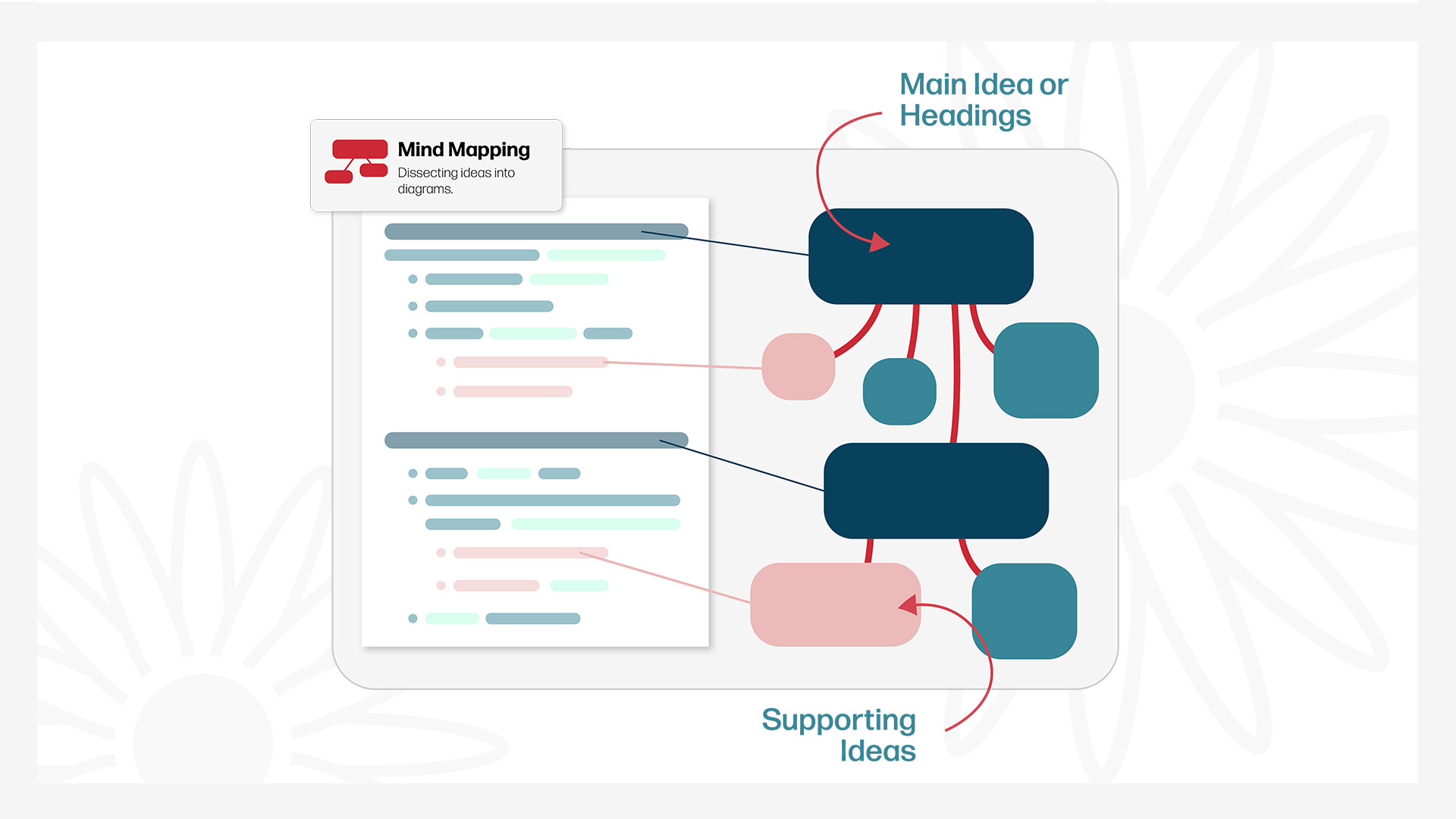
Another powerful technique to enhance your note-taking is Mind Mapping — a visual method that helps you organize information spatially rather than linearly. Instead of writing down notes from top to bottom, you begin with a central concept and branch out with keywords, ideas, and relationships that radiate outward like a web.
This technique is ideal for visual learners who absorb information better through shapes, color, and structure. It mirrors how the brain naturally organizes thoughts — not in neat bullet points, but in interconnected nodes. Mind mapping also makes it easier to see how ideas relate to one another, especially in subjects like science, literature, or business studies where concepts overlap and evolve.
Students use mind maps to brainstorm essay ideas, plan projects, or review complex topics by visualizing them holistically. You can also add drawings, symbols, or color-coded branches to make the structure even more memorable. Research by Buzan Centre shows that mind mapping can improve memory recall by up to 32%.
That said, traditional mind mapping usually requires drawing by hand or using clunky design tools. That’s where Notedaisy makes things easier. The platform lets you create instant mind maps from your notes — automatically organizing topics and subtopics into a clear, dynamic layout. No design skills required.
Plus, because your mind maps are digitally connected to your other notes, you can use AI for studying to generate summaries, create flashcards from each node, or even search across related concepts. Mind mapping, supercharged.

Leverage Visual Learning (It’s 2025, Not 1995)
Let’s be real — plain text isn’t always the best way to learn. Studies show that most people retain more when information is presented visually. That’s why visual note-taking tools are one of the smartest ways to improve comprehension and memory. Think diagrams, charts, color-coded cues, icons — anything that helps turn complex info into something your brain can actually remember. According to a study published in Frontiers in Psychology, visual learning improves knowledge retention and conceptual understanding.
Visual learning isn’t just about making your notes “pretty.” It’s about making them functional. When you highlight key terms, group ideas with color, or sketch relationships between concepts, you’re actively processing the material — not just passively writing it down. That’s the difference between remembering something for a quiz vs. actually understanding it long-term.
Students studying subjects like biology, history, or psychology often benefit from visual tools. These fields require understanding of systems, sequences, or relationships — things that are hard to grasp through words alone. Visuals turn abstract ideas into concrete mental models.
Notedaisy was designed with this in mind. It lets you create color-coded notes, drag-and-drop visual elements, and generate smart diagrams from your content. Even better, our AI can highlight key takeaways, convert text into visuals, and help you study through spaced repetition using images — not just words.
You’re not in 1995 anymore. Notes aren’t just lines on a page — they’re dynamic, visual learning tools. And Notedaisy helps you tap into that power, effortlessly.
Don’t Just Take Notes — Understand While You Write
Most students think note-taking is about capturing everything. But the truth is, great notes aren’t about transcription — they’re about comprehension. If you’re just copying what your teacher says word-for-word, you’re doing passive note-taking. And passive notes rarely stick.
The most effective learners engage in active learning. That means thinking critically while you write. Ask yourself: “What’s the main point here?” “How does this idea connect to what I already know?” When you do that, you’re not just writing — you’re processing. You’re turning information into understanding.
One proven trick? Use abbreviations and symbols. Write “↑” instead of “increase.” Use arrows and shorthand to keep pace while still grasping the big picture. The faster you synthesize, the faster you learn.
Notedaisy was built to support this exact process. Its AI summarizer breaks down long lectures into bite- sized points, helping you catch what matters most. It’s note-editor makes it easier to add symbols and other visual guides to assist your understanding. No more scrambling to write everything — just focus on the ideas, and let the tools support your thinking.
When your notes reflect your thought process, not just the lecture, you’ll retain more. And when that next exam rolls around? You’ll realize you didn’t just write notes. You understood them.
Organize Notes by Subject, Not by Chaos
Be honest — is your notes folder a black hole? You swear you saved that lecture from two weeks ago… somewhere. But now it’s buried under 37 untitled docs and a graveyard of screenshots.
This is the silent killer of study productivity: disorganized notes. Even the best note-takers fall into the trap of good input, poor retrieval. If you can’t find your notes, you may as well have not taken them at all.
The solution? Treat your notes like a knowledge management system — not a junk drawer. Group by subject. Use clear titles. Tag topics. Add keywords you’ll actually remember when searching. Basically: future-you should thank past-you for making everything easy to find.
This is where Notedaisy shines. It turns your entire notebook into a searchable knowledge base. With smart folders, tags, and AI-assisted search, you can ask things like, “What were the stages of mitosis again?” — and Notedaisy will pull it straight from your own notes.
Chaos is optional. But if your goal is to study smarter and save time, structure is essential. Let your notes work for you, not against you.
Ready to Take Smarter Notes?
Taking notes faster doesn’t mean rushing. It means being strategic — using the right techniques, visual aids, and tools designed to help you learn better. If you’re ready to stop copying and start understanding, Notedaisy is your new secret weapon.
✨ Try Notedaisy today and turn your study notes into something you’ll actually remember.